
In this post AWS EBS Best Practices using SoftNAS Cloud NAS. AWS Elastic Block Storage (EBS) volumes are block-level, durable storage devices that attach to your EC2 Instances. EBS Volumes can use as your primary storage device for an EC2 instance or database, or throughput-intensive systems requiring constant disk scans.
AWS EBS volumes exist independently from your EC2 instances and can retain after the associated EC2 instance has been deleted. AWS provides various types of EBS volumes allowing you to tailor the right volume to meet your budget and application performance requirements.

SoftNAS AWS EBS best practices
Amazon Elastic Block Store (Amazon EBS) provides persistent block-level storage volumes for use with Amazon EC2 instances in the AWS Cloud. EBS is not about any specific device type, it’s about providing EC2 instances with highly available and durable storage volumes. To achieve this, each Amazon EBS volume is automatically replicated within its Availability Zone. Amazon EBS volumes offer the consistent and low-latency performance needed to run your workloads.
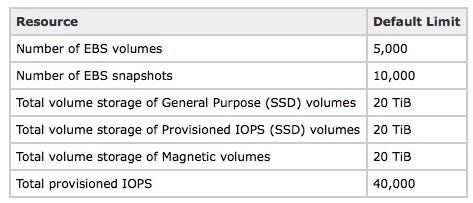
According to Amazon documentation, these are the Amazon EBS limits within an AWS account:
With large numbers of EBS volumes, the time to attach during boot can be high and potentially fail.
When a volume does not attach, SoftNAS resolves through an AWS-supplied API to ensure each volume does get attached before completing the boot. When SoftNAS is implemented along with Amazon Web Services, it has been proven that you can scale to very large numbers of EBS Volumes without boot-attach issues.
Best practices for using AWS EBS volumes with SoftNAS:
- Each EBS volume attached to an instance will be constituted on independent storage hardware within AWS infrastructure. Configure SoftNAS storage pools as RAID 0 to stripe across multiple EBS volumes to gain the highest possible bandwidth and performance
- SoftNAS disk device protection (RAID levels 1, 10, 5, 6, 7) is unnecessary and should not be used in a storage pool with EBS volumes. Using any RAID level beyond RAID 0 merely increases storage costs with little benefit in reducing failure rate or performance. EBS Volumes are IOP limited. EBS General Purpose SSD is limited to 10,000 IOPs per volume. EBS Provisioned IOPs are limited to 20,000 IOPs per volume. EBS Magnetic is more severely limited to 40–200 IOPs, which represents the capabilities of today’s spinning media. In testing, we have seen the EBS SSDs provide more IOPs in shorter durations, but appear to have forced limiters with longer sustained IOP usage. By striping across multiple EBS Volumes, of any type, the IOPs can be higher than a single EBS Volume can provide. Of course, workload and queue depth dictates whether higher IOPs are achieved.
- AWS EBS annual failure rate (AFR) is published to be between 0.1% and 0.2%. Aggregating multiple EBS volumes within a SoftNAS storage pool will magnify the AFR. The AFR is roughly the number of EBS volumes multiplied by the AFR rate. Our recommendation is to understand the risk and size of storage pools appropriately. Using 5 EBS volumes within a storage pool (totaling up to 80 TB of capacity) will be an acceptable AFR for most use cases, and many use cases can tolerate an even higher AFR.
- Use multiple SoftNAS storage pools for very high-capacity deployments. EBS volumes separated by storage pools do not affect AFR.
- Use SoftNAS backup to create EBS Snapshots of storage pools to further protect data. EBS snapshots are arguably the most useful and the most difficult-to-understand feature of EBS. You can back up the data on your EBS volumes to Amazon S3 by taking point-in-time snapshots. EBS Snapshots are incremental, which means that in order to create a subsequent snapshot, EBS saves only the disk blocks that have changed since the previous snapshots to S3.SoftNAS has integrated EBS snapshots with one-button backup and restore options for storage pools.
- SoftNAS SNAP HA provides data protection and high availability. Data is replicated across availability zones and failover is managed between a pair of SoftNAS instances in private or public VPCs. SNAP HA is recommended for a complete data protection strategy, replicating the storage from one region/zone to another.
- SoftNAS SnapReplicate can be used as part of a disaster recovery strategy by replicating data to a remote region or another data center.
SoftNAS AWS NAS Storage
SoftNAS is a software-defined AWS NAS delivered as a virtual appliance running within Amazon EC2. Provides NAS capabilities suitable for enterprise storage, including Multi-Availability Zone high availability with automatic failover in the Amazon Web Services (AWS) Cloud.
SoftNAS offers AWS customers an enterprise-ready NAS capable of managing your fast-growing data storage challenges including AWS Outpost availability. Dedicated features from SoftNAS deliver significant cost savings, high availability, lift and shift data migration, and a variety of security protection.
Comments
Post a Comment